
⚠️ Disclaimer: my experience with Camunda is mainly with version 7, but most points here still hold with Camunda 8+.

Camunda is a tool that can help you manage the state of a business process. It integrates with Spring Boot as a java library, where it connects to the process engine, loading any BPMN files in the resources folder. It will handle the state of complicated, long-running workflows, offer insight into the process, and many more small features. It sounds great on paper, but is the developer experience really that effortless?
In this post I’ll share the most important learnings during my 4 years of developing a backend application with Camunda.
The start
My first experience with Camunda was quite positive. Their nice dashboard, that came out of the box in Camunda 7, and functional Camunda Modeler to build BPMN files with drag and drop, allowed us to do quick prototyping. We had a simple flow running within the hour.
We just needed to setup a PostgreSQL database where Camunda would store its state and voilà!
There was some overhead as the startup time of our Spring Boot application increased significantly, but this was not a big issue at the time.
Custom code
So now that we had the basics setup, it was time for the actual automation that Camunda claims to help with. In the BPMN modeler you create service tasks that can call a Spring Bean. The name of this bean needs to be defined as a string literal in the modeler. This already raised a question with me: “what if I rename the bean and forget to update the BPMN model?”. A valid concern as we learned later.
In the executed code Camunda provides access to the process instance ID (and businessProcessId) - super useful if you want to store external data and link it to a specific instance.
Retries
Camunda also provides out of the box retries, even supporting incremental backoff. This is a great feature for when the code connects to external systems and transient errors will disappear when a good retry strategy is chosen.
For us, there was one downside to the fact that retries are handled outside the code: we didn’t want to get any
ERROR logs alerts before the retry is exhausted. We alert on every ERROR log and don’t want to get notified when
a retry might fix the issue.
We were able to solve it by implementing a custom error handler that checks how many retries Camunda has left.
Reusable BPMN models
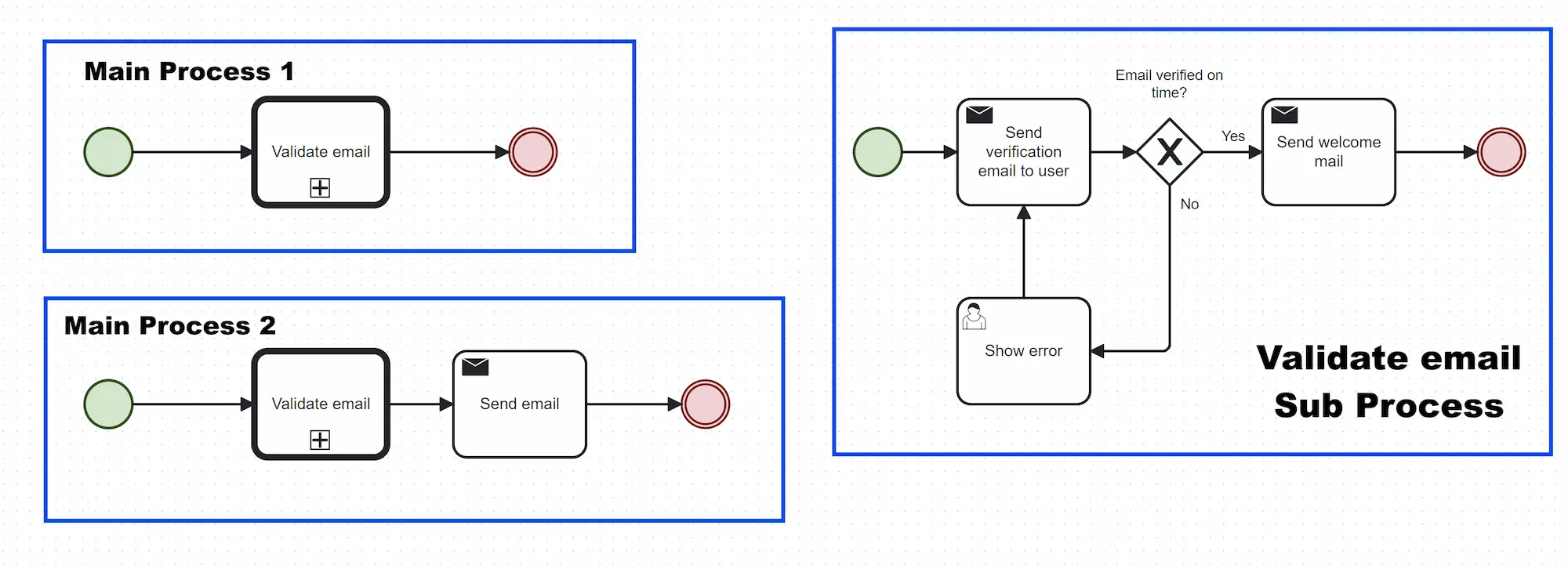
The more complex the business process became, the more need there was for reusable processes. For shared pieces of logic we would create smaller BPMN processes that can be included in other processes. This reduced duplication (DRY), but had some negative side effects:
- Process migrations suddenly became a lot more difficult. See section Process Migrations.
- Subprocess-ception (subprocess in subprocess in subprocess) caused difficult-to-view process diagrams
- The modeler doesn’t support clicking through, making navigating a pain
Process Migrations
In our use case, the business process was long-running, but often changing. As we are part of an Agile development team, we quickly want to adapt to new user requests or changing reality. So our strategy was to try to migrate all running process instances to the newest version of the process, always. The benefit is that there is always just one process to maintain and understand, and users could use new steps immediately.
We quickly found out that simple migrations were very easy to do, like renaming a task. But anything more involved than that was a pain in the butt. We built our own little migration framework on top of the Camunda API to allow us to automate the migration on startup of our application.
Migrating parallel gates
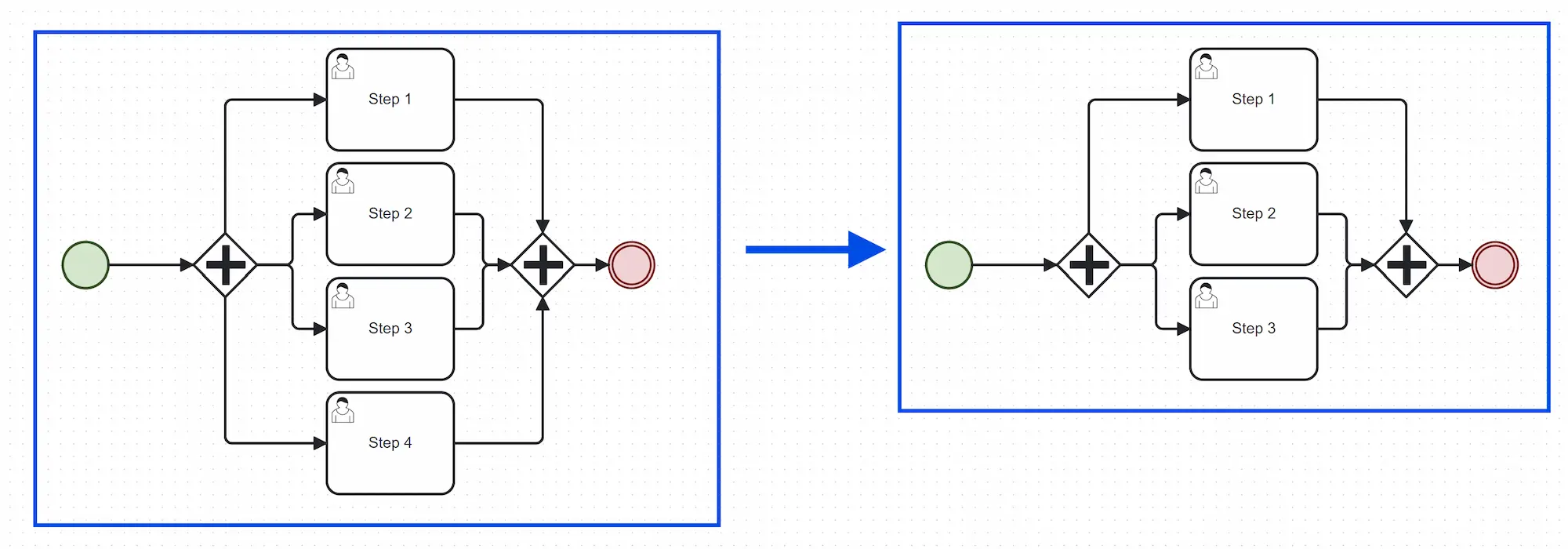
One example is migrating parallel gateways. Removing one branch of a gateway is tricky because once a parallel gateway is started with a certain amount of branches (4 in the example), the collect gateway also expects 4 branches to complete. Even when removing one branch, it still expects 4. This results in this tricky migration:
- Pause the process instance
- Check if the instance is active in the branch to delete
- Delete the token waiting at any task in the deleted branch
- Add a token to the parallel gateway (before)
- Unpause the process
Now imagine if this branch had called sub-processes. Too much complexity!
In the end we opted for a 2-step migration: first replace the user task with an empty service task that completes immediately, then when there are no running processes waiting for it anymore, delete the branch.
Process variables
Sometimes we needed to add extra data to a process instance. Not only for steering the process, but also for functional requirements. One step would collect data, the other step would do something with it. This is where process variables come in handy.
You can add full POJOs as JSON by using the org.camunda.spin:camunda-spin-dataformat-json-jackson, but it has
limitations. For example, when changing the structure of your POJO it’s not so straightforward to update all existing
process variables. It again requires custom migration code. The good thing is that you can access the json object in the
BPMN files with expressions like ${customer.type == "NEW"}.
What we learned is that the native Camunda variables are not always the best option. So we decided to store extra data in a separate database, where we used the ID of the main table as businessKey.
Camunda Rest API
Camunda exposes a fairly complete REST API for interacting with processes, tasks, and variables. This is useful when external systems need to trigger or monitor process instances, or when building custom dashboards or admin panels.
This is one of the features that I love. It comes out of the box and just works. Unfortunately, many of the useful REST API operations are not available in Camunda 8 anymore.
Camunda 7 to Camunda 8
So we’ve built quite a big application with Camunda 7 and just when things stabilized, the messages reaches us that there is a new version of Camunda that works fundamentally different. We would need to manage a Camunda cluster ourselves and update our code. It (currently) doesn’t support all features we currently use and requiring us to rethink how we use it.
Some examples of features that were not available when we wanted to migrate to C8:
- Not all BPMN elements we used were available
- Process instance migration was not supported
- The REST API we relied upon was dropped without a proper replacement
Some of these have been implemented in the meantime, but the migration for our team has therefore been postponed.
Also, hosting Camunda 8 ourselves using the helm files caused a lot of issues. Camunda 7 will reach end of support between 2027 & 2030, so we are considering alternatives.
Is Enterprise worth it?
We did end up acquiring Camunda Enterprise, hoping it would smooth out some of the rough edges we were dealing with — especially around monitoring, migrations, and overall process insight.
It did bring some benefits. The improved Cockpit Pro interface gave us better visibility into running processes, and the migration tools saved us a bit of manual work. But the core developer experience didn’t improve. Most of the issues we were facing — like tightly coupled models and code, fragile process migrations, and limited navigation in complex models — remained just as challenging. The support sessions were limited as we had to work around Camunda’s limitations ourselves.
In hindsight, it felt like we paid for a better flashlight, but we were still stuck navigating the same cave.

Conclusion
Camunda gave us a structured way to model and automate complex business processes. It helped us ship fast in the early days and offered just enough tooling to feel in control. But as the application — and process logic — grew, the tradeoffs became increasingly clear.
The tight coupling between BPMN and code made refactoring scary. The complexity of migrations turned even simple process changes into small projects. And while Camunda gives you a lot of power, it often feels like you’re working against the grain when your process doesn’t perfectly fit the “happy path.”
Camunda 8, with its architectural shift and missing features, didn’t inspire confidence either. Even with Enterprise support, we often felt like we were investing more time working around the tool than benefiting from it.
If your process is stable, linear, and long-running, Camunda might be a great fit. But if you’re building a fast-moving backend in an agile team, don’t underestimate the hidden cost of process modeling. Sometimes plain old code makes for the best process engine.